
Kickserv alternative
A software comparison becomes more useful when your team can try to complete familiar tasks. If you are considering a Kickserv alternative, turn the evaluation into a small, defined pilot instead of relying entirely on feature lists.
Plans from $89 USD per month. Unlimited technicians on every plan. No contract required.
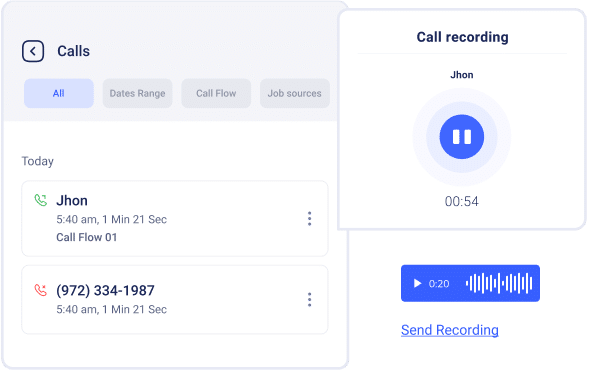
Integrated phone system
Make and receive calls in the app, with call recording.
Uleadz is an option to examine for managing service jobs and organizing the information your team needs. A focused demonstration can help you decide whether its documented capabilities match the work your business performs.
Define the reason for changing
Choose the specific issue that prompted your search. Are staff missing job details? Does the business need different information captured on each request? Are you reviewing team access or reporting as the company grows?
Write the issue as an observable task. “Find the access instructions for this job” is easier to evaluate than “improve organization.” Give the task to the person who would perform it in normal work, and ask them to describe what a satisfactory outcome looks like.
Try a small sample of fictional work
Prepare three fictional jobs with different needs. One might have straightforward instructions; another might require an extra field; the third might need a clear note explaining a change. These are test cases, not claims about customer results.
Uleadz documents custom job fields for capturing information specific to the business. Use a field your team needs and ask how it is entered, located, and understood by the person handling the work. Explore custom job fields.
Then examine organization across the sample. Uleadz’s job-management page describes notes and customizable tags. Ask staff to explain how they would keep records understandable as more jobs are added. Review job management.
Score the tasks consistently
For each test, record whether the person completed it, needed guidance, or encountered an unresolved requirement. Note the setup or training involved. Avoid declaring a product easier simply because its presenter knew the interface better than your team did.
Apply the same standard to any functions you require beyond the sample: reports, time tracking, expense tracking, map views, and accounting connections. Uleadz’s documented fields and tags do not by themselves verify equivalent versions of those capabilities.
Confirm how information stays usable
Ask how your team would retrieve the records it needs and what options exist if it later changes systems. Confirm the formats, scope, permissions, and commercial terms relevant to your business. Do not assume export or migration behavior that has not been established.
Before a switch, agree on how open jobs would be handled, who would validate the transfer, and when the team would begin using the new workflow. A pilot should resolve enough uncertainty to support a purchasing decision, not quietly become a live migration.
Is a demo enough to prove every requirement?
A demo supports the tasks it actually demonstrates. Keep unresolved needs visible and obtain specific confirmation before making them part of your decision.
Should the office or technicians evaluate the product?
Include both when their tasks differ. The people who enter information and the people who use it may identify different requirements.
Plans and pricing
Every plan lists unlimited technicians, and no contract is required. Annual billing is also available. Plans differ in office users, SMS, calling minutes and phone lines.
Plan a practical Uleadz demo. Bring three fictional jobs and the task list your team wants to evaluate. Contact Uleadz.
Sources and comparison date
Product information reviewed 2 November 2026: Uleadz custom job fields, and Uleadz job management. Published by Uleadz. The pilot is an evaluation method; no completion times, savings, or customer outcomes are claimed.